In today’s fast-moving business world, meeting room booking software has become an essential tool for organizations that want to improve workplace efficiency, reduce scheduling conflicts, and create a better employee experience. Whether you run a corporate office, a coworking space, a growing startup, or a multi-branch enterprise, choosing the right meeting room booking software can make a major difference in how your team collaborates and uses office resources.
Many businesses still rely on manual booking methods, spreadsheets, shared calendars, or informal communication to reserve conference rooms. While these methods may work for very small teams, they often create confusion, double bookings, wasted meeting spaces, and unnecessary frustration as the business grows. That is why more companies are now investing in conference room booking systems, room scheduling software, and smart workplace management tools.
But with so many options available, how do you choose the best solution for your business?
This guide will help you understand what meeting room booking software is, why it matters, what features to look for, and how to evaluate the right platform based on your business goals. If you are planning to invest in a smart workspace solution, this article will help you make a confident and informed decision.
What Is Meeting Room Booking Software?
Meeting room booking software is a digital solution that helps businesses manage the reservation and scheduling of meeting rooms, conference halls, boardrooms, training rooms, and collaborative workspaces. It allows employees to check room availability in real time, book rooms instantly, avoid overlapping reservations, and manage cancellations or schedule changes efficiently.
A modern meeting room management system often includes features such as:
- Real-time room availability
- Calendar integration
- Automated notifications
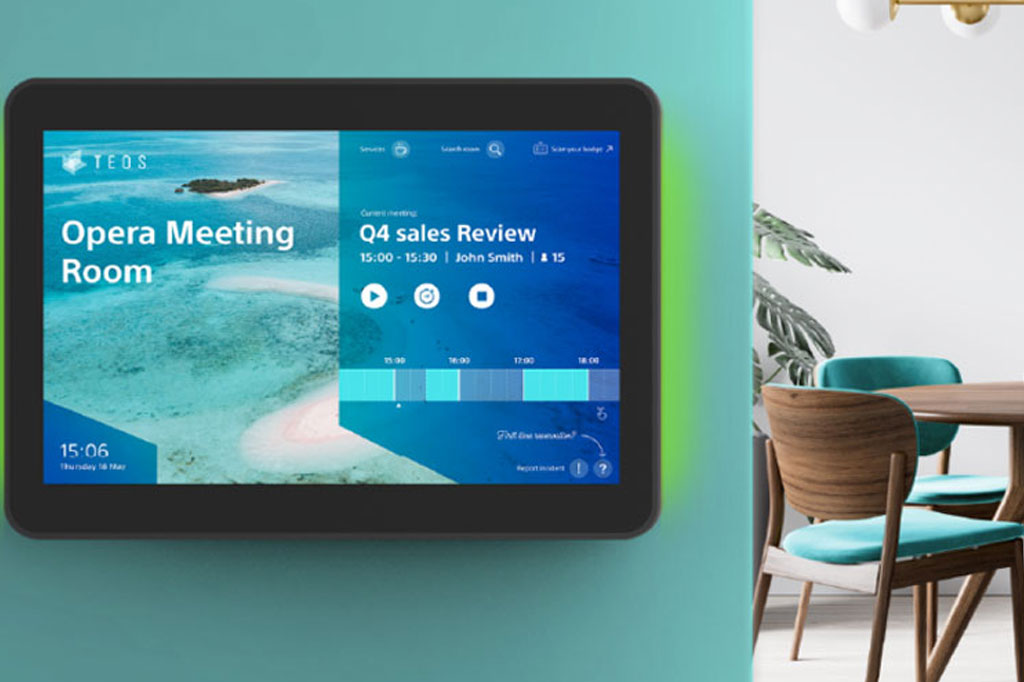
- Touch display panel support
- Room usage reporting
- Visitor and employee scheduling
- Integration with workplace tools
Instead of wasting time searching for an available room or dealing with booking conflicts, teams can use a simple interface to find and reserve the right space in seconds.
Why Your Business Needs Meeting Room Booking Software
Businesses today need smarter ways to manage office spaces. As hybrid work, flexible schedules, and collaborative environments become more common, meeting room management is no longer just a convenience. It is a productivity requirement.
Here are some key reasons why companies invest in meeting room booking software for business:
1. Reduces Scheduling Conflicts
Double bookings and last-minute confusion can disrupt meetings and damage workflow. A reliable room reservation system prevents overlapping reservations by showing live room availability.
2. Saves Employee Time
Employees should not waste valuable time checking rooms manually or sending multiple emails to confirm availability. The software simplifies the process and improves efficiency.
3. Improves Workspace Utilization
Many offices do not fully understand how their meeting spaces are being used. Room scheduling tools provide data and analytics that help businesses optimize space planning.
4. Enhances Employee Experience
A smooth booking experience creates a more organized and professional work environment. Employees can find the right room with the right equipment without unnecessary frustration.
5. Supports Hybrid Work Environments
As more companies adopt hybrid work models, businesses need systems that make office resources easier to manage. Booking software helps coordinate room use among in-office and remote teams.
Key Factors to Consider When Choosing Meeting Room Booking Software
Choosing the best meeting room booking software is not about picking the most expensive or most popular option. It is about selecting a system that fits your business size, workflow, technology stack, and future growth plans.
1. Understand Your Business Requirements First
Before comparing software providers, define your actual needs.
Ask yourself:
- How many meeting rooms do you manage?
- Do you need booking for only rooms, or desks and shared spaces too?
- Will employees book from desktop, mobile, or display panels?
- Do you need support for multiple office locations?
- Does your team use Microsoft 365, Google Workspace, or another calendar system?
- Do you need reporting and analytics?
- Will visitors also use the system indirectly?
A small office may only need basic room scheduling, while a large enterprise may require an advanced conference room management system with integrations, analytics, user permissions, and multi-location support.
When you clearly understand your internal needs, it becomes much easier to shortlist the right software.
Look for a Simple and User-Friendly Interface
One of the most important factors in choosing room booking software is usability. If the system is too complex, employees may avoid using it, which defeats the purpose of digital scheduling.
The best software should offer:
- Easy room search and filtering
- Clean dashboard design
- Quick booking process
- Clear room status visibility
- Easy cancellation and rescheduling
- Mobile-friendly access
A user-friendly system encourages adoption across the organization. Even the most feature-rich platform will fail if employees find it confusing or time-consuming.
Check Real-Time Availability Features
Real-time room availability is a must-have feature in any modern meeting room booking system. This allows employees to see which rooms are available right now, which are reserved, and which will become free soon.
This feature is especially useful in busy offices where meeting schedules change frequently. Real-time visibility helps reduce:
- Booking confusion
- Empty but reserved rooms
- Unused meeting slots
- Last-minute room conflicts
If your business values fast decision-making and flexible collaboration, this feature should be non-negotiable.
Evaluate Calendar Integration Capabilities
A good meeting room booking software solution should integrate smoothly with the tools your team already uses. Calendar integration is especially important.
The best solutions usually support:
- Microsoft Outlook
- Microsoft 365
- Google Calendar
- Google Workspace
- Exchange
- Team collaboration tools
With proper integration, room bookings can sync automatically with employee calendars, making scheduling easier and reducing errors. This also helps ensure that meeting invitations, room reservations, and schedule updates stay aligned.
If your business already depends heavily on digital calendars, this feature is essential.
Prioritize Mobile Access and Flexibility
Modern teams are not always sitting at a desk. Employees often need to book meeting rooms from their phones, tablets, or while moving between departments and office locations.
Choose a software platform that offers:
- Mobile app access
- Responsive web interface
- Tablet or kiosk compatibility
- On-the-go booking and cancellation
Mobile accessibility is especially important for businesses with hybrid teams, field staff, regional offices, or dynamic office environments.
Consider Analytics and Reporting Features
Many businesses focus only on booking functionality and forget the value of workplace data. A strong meeting room management software platform should provide detailed insights into how your spaces are being used.
Useful reporting features include:
- Room occupancy rates
- Peak booking times
- No-show meetings
- Frequently used rooms
- Underutilized spaces
- Booking trends by team or department
These insights help you make better operational decisions. For example, if one room is constantly overbooked while another is rarely used, you can redesign space allocation more effectively.
Analytics also support long-term planning, budgeting, and workplace optimization.
Check Integration with Smart Office Tools
If your business is building a smart office environment, you may want more than just basic room scheduling. Many advanced platforms now support integration with:
- Digital room display panels
- Visitor management systems
- Access control systems
- HR and employee scheduling tools
- Facility management software
- Video conferencing platforms
These integrations help create a connected office ecosystem. For example, when someone books a meeting room, the room display updates automatically, the meeting invitation syncs to calendars, and access permissions can be linked if needed.
For companies looking for digital transformation, this level of integration adds significant value.
Review Customization and Scalability
The best software for one company may not work for another. That is why scalability and customization are important.
As your business grows, your meeting room booking needs may change. You may add:
- New office branches
- More employees
- Additional meeting spaces
- Flexible desk booking
- New security requirements
- Advanced reporting needs
Choose a solution that can scale with your business. Also check whether the software can be customized with:
- Company branding
- User roles and permissions
- Booking rules
- Approval workflows
- Room categories
- Language options
A scalable and flexible platform protects your investment over the long term.
Focus on Security and Data Protection
Any business software that handles employee schedules, office resources, and internal booking data should offer strong security.
Make sure the vendor provides:
- Secure user authentication
- Role-based access control
- Encrypted data handling
- Cloud security standards
- Backup and recovery options
- Compliance with relevant privacy practices
For larger businesses or organizations handling sensitive internal operations, software security should be treated as a top decision factor, not an afterthought.
Compare Cloud-Based vs On-Premise Options
When selecting meeting room booking software, you also need to decide how the system will be deployed.
Cloud-Based Software
Cloud solutions are hosted online and accessed through the internet. They are ideal for businesses that want:
- Lower upfront cost
- Easy updates
- Remote accessibility
- Faster deployment
- Minimal internal IT management
On-Premise Software
On-premise systems are installed on your own servers. They may be more suitable for businesses that need:
- Full internal control
- Specific compliance requirements
- Custom infrastructure integration
- Higher control over security policies
For most modern businesses, cloud-based solutions are the more practical choice, but the right answer depends on your industry, IT environment, and operational priorities.
Assess Vendor Support and Service Quality
Software is not just about features. The vendor behind the solution matters just as much.
Before making a final decision, evaluate:
- Implementation support
- Training assistance
- Customer service responsiveness
- Technical support channels
- Upgrade policy
- Maintenance service
- Local support availability
If the software provider does not offer reliable support, your team may struggle during setup or face challenges later.
A trusted technology partner can help your business implement the system smoothly and get better long-term results.
Read Reviews Request Demos and Compare Use Cases
Never choose software based only on marketing claims. Ask for a live demo, review actual use cases, and compare feedback from real users.
Pay attention to:
- Ease of setup
- User experience
- System reliability
- Integration success
- Support quality
- Performance under real office conditions
A demo helps you see whether the system truly matches your business workflow. It also gives your team a chance to evaluate the interface and ask relevant questions before purchase.
Common Mistakes Businesses Make When Choosing Room Booking Software
Many companies rush into buying a solution without proper evaluation. Here are some common mistakes to avoid:
Choosing Based on Price Alone
Low-cost software may lack key features support or scalability. Focus on overall value, not just initial cost.
Ignoring User Experience
If employees do not find it easy to use, adoption will suffer.
Overlooking Integration Needs
A standalone tool may create more work if it does not connect with your calendars and workplace systems.
Not Planning for Growth
A system that works for 20 employees may not work for 200.
Skipping Reporting Features
Without data, you miss important opportunities to improve office space utilization.
How GCTL Infosys Can Help Businesses with Smart Booking Solutions
At GCTL Infosys, we understand that every business has different operational needs. As a leading software and web development company in Dhaka, Bangladesh, we deliver innovative digital solutions that help organizations improve efficiency, streamline workflows, and modernize workplace management.
If your business is planning to implement a meeting room booking software solution, GCTL Infosys can help you by providing:
- Customized software development
- Scalable business management solutions
- Smart office software integration
- User-friendly interface design
- Reliable IT consultancy
- End-to-end implementation support
Our experienced team of developers, designers, and IT professionals works closely with businesses to build solutions tailored to their goals, size, and future growth. Whether you need a simple room reservation tool or a more advanced scheduling platform integrated with your office systems, GCTL Infosys can help you move forward with confidence.
Final Thoughts
Choosing the best meeting room booking software for your business is an important decision that affects productivity, collaboration, and workplace efficiency. The right solution should not only make room reservations easier but also support your broader business goals.
When evaluating your options, focus on usability, real-time availability, calendar integration, mobile access, analytics, scalability, security, and vendor support. Take the time to understand your requirements, test available solutions, and select a platform that can grow with your organization.
A smart booking system is more than just a scheduling tool. It is an investment in a better workplace experience.
If your business is ready to improve office space management with a modern, reliable, and scalable digital solution, GCTL Infosys is ready to help.
FAQs
1. What is meeting room booking software?
Meeting room booking software is a digital tool that helps businesses schedule, manage, and monitor meeting room reservations efficiently. It reduces booking conflicts and improves workspace organization.
2. Why is meeting room booking software important for businesses?
It helps save time, improve room utilization, reduce double bookings, and create a more efficient workplace for employees and management.
3. What features should I look for in meeting room booking software?
Key features include real-time availability, calendar integration, mobile access, reporting, user-friendly design, scalability, and integration with office systems.
4. Is cloud-based meeting room booking software better than on-premise software?
For many businesses, cloud-based software is easier to deploy, maintain, and access remotely. However, on-premise solutions may be better for organizations with strict internal IT or compliance requirements.
5. Can meeting room booking software be customized for my business?
Yes, many solutions can be customized based on your number of rooms, booking policies, branding, integrations, user permissions, and reporting needs.