If you manage a bank branch, hospital reception, diagnostic center government service desk telecom customer care, or any busy front desk in Bangladesh you already know the truth a long queue is more than a line of people it’s a customer experience problem. Long waiting time creates frustration, arguments with staff, service delays, and sometimes even lost customers.
That’s why many organizations now look for queue management system software in Bangladesh a digital solution that issues tokens organizes service counters, shows queue status on display screens and helps staff serve customers faster and more fairly.
But not all queue systems are the same. Some are basic token printers. Some include mobile booking, SMS notifications, analytics dashboards, branch reporting, and integration with ERP or CRM. So the real question is: How do you choose the best queue management system software in Bangladesh for your organization?
This guide will help you decide based on real operational needs without confusing technical jargon.
What Is Queue Management System Software?
A Queue Management System (QMS) is software that helps manage customer flow in service locations by:
- Issuing a token number (printed, digital, or mobile)
- Placing customers in a queue based on service type
- Routing customers to the right counter/desk
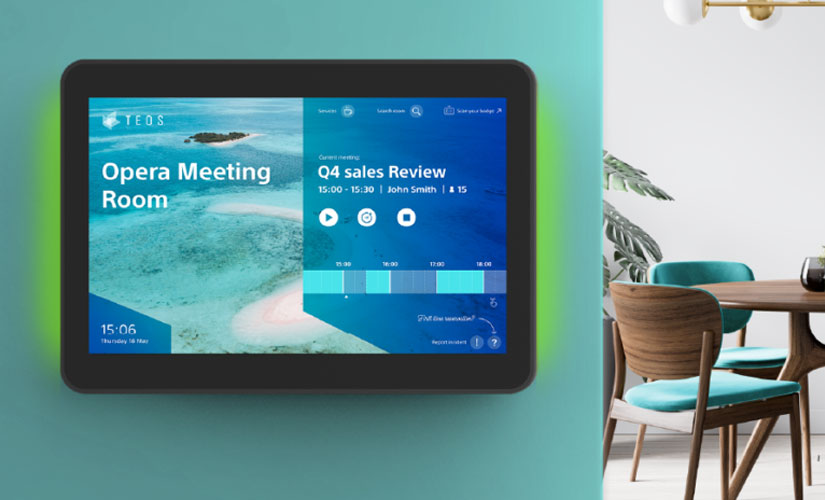
- Displaying token calls on TV/LED display with audio announcement
- Tracking waiting time, service time, and staff performance
- Generating reports for management
In short, it replaces manual queue handling with a structured, fair, and trackable process.
Why Queue Management Software Matters in Bangladesh
Bangladesh service environments are usually high-volume and walk-in driven. A good QMS helps you:
- Reduce crowding at reception
- Serve customers in a fair order (first-come, first-served)
- Prioritize special cases (senior citizens, emergency patients, VIP)
- Reduce staff conflict and customer stress
- Monitor daily traffic and peak hours
- Improve efficiency with better counter allocation
Even small improvements in waiting time can significantly improve customer satisfaction.
1. Identify Your Use Case Don’t Buy Features You Won’t Use
Different businesses need different queue workflows. Start by defining your environment.
Common QMS use cases in Bangladesh
- Hospitals & Diagnostic Centers: OPD registration doctor appointment queue lab test token report delivery queue
- Banks & NBFIs: account opening cash deposit/withdraw customer service desk
- Government Offices: passport, licensing, utility bill services
- Telecom Customer Care: SIM replacement, billing, technical support
- Retail Service Centers: warranty claim, repair intake, pickup queue
Ask yourself:
- Do you have multiple service types?
- Do you need separate queues per department?
- Do you need appointment walk-in combined?
Your answers will guide your selection.
2. Decide the Queue Model You Need
A queue system can be simple or advanced.
A) Single Queue Multiple Counters
Best for: simple customer service desks
Example: one token line next available counter serves.
B) Multiple Queues by Service Type
Best for: banks, hospitals, government offices
Example: token categories like:
- A: General Service
- B: Cash Counter
- C: Account Opening
- D: VIP/Senior
C) Appointment Walk-In Hybrid
Best for: clinics, diagnostic centers, visa offices
Example: appointment token has priority, walk-ins are served between slots.
The best queue management software should support the model that fits your workflow.
3. Choose the Right Features Core vs Advanced
Focus on what will actually improve operations.
Core Features (Must-Have in Any QMS)
- Token Generation
- Token kiosk (touch screen) or token printer
- Token categories/services selection
- Counter Calling Panel
- Staff can call next token
- Recall token option
- Transfer token to another counter (optional but useful)
- Queue Display System
- TV/LED display showing token number + counter
- Audio announcement (Bangla/English option is a plus)
- Admin Dashboard
- Manage counters, services, users
- Configure token formats and rules
- Basic Reports
- Total tokens served
- Average waiting time
- Peak hour traffic
- Staff-wise service count
Advanced Features (Choose Based on Need)
- SMS notification when token is near (reduces crowding)
- Mobile token / QR-based token (great for modern service centers)
- Online appointment booking (clinics, diagnostics)
- Branch-wise reporting (organizations with multiple branches)
- Customer feedback survey after service
- Integration with ERP/CRM/Hospital Management System
- Multi-language UI for staff and customers
- Priority queue rules for emergency/VIP/senior citizen
4. Hardware Compatibility Bangladesh Reality Check
Queue management is a mix of software hardware. Make sure the provider supports reliable hardware options.
Common QMS hardware
- Token printer (thermal printer)
- Token kiosk (touch screen for self-service)
- Display TV/LED screen for queue status
- Audio system (speaker) for announcements
- Network router/switch for stable connectivity
- Optional:
- Barcode/QR scanner
- POS-like counter display
- Tablet counter calling device
Key questions to ask vendors
- Is the system stable if internet goes down? (LAN mode is helpful)
- Which printer models are supported and available locally?
- Can you run on Android tablets for counters to reduce hardware cost?
- Do you provide installation and onsite setup in Bangladesh?
If hardware support is unclear, you may face delays and extra costs later.
5. Software Type Cloud vs On-Premise Which Is Better?
Cloud-based QMS
Pros: easy updates access reports from anywhere lower initial setup
Cons: depends on stable internet; ongoing subscription may apply
On-Premise Local Server QMS
Pros: works even without internet; more control over data
Cons: requires maintenance and local server responsibility
Hybrid
Many organizations in Bangladesh prefer a hybrid approach:
- works on local network
- syncs reports to cloud when internet is available
Choose based on your service environment and IT capability.
6. Reporting and Analytics This Is Where ROI Comes From
A good QMS is not just a token display. It should help management make decisions.
Reports you should demand
- Hourly traffic analysis
- Average waiting time per service category
- Counter-wise performance
- Service time breakdown
- No-show or skipped token logs
- Daily/weekly/monthly trends
If you have multiple branches:
- Branch comparison reports
- Centralized dashboard
These reports help you optimize staffing, reduce bottlenecks, and prove service improvements.
7. Ease of Use for Staff Simple UI Wins
In busy environments, staff don’t have time to learn a complicated system.
Your QMS should have:
- Simple counter screen: call next, recall, hold, transfer
- Role-based access (admin vs operator)
- Quick configuration for adding counters or services
- Training materials and user guide
Ask for a demo and check how many clicks it takes to call the next token. If it feels slow, it will reduce efficiency.
8. Customization for Bangladesh Service Rules
Your workflow might require customization like:
- Special token category for senior citizens
- Separate counters for women/priority service
- Doctor-wise token queue
- Time-slot appointment queue
- Service-based routing rules
- Bangla display and voice announcements
Many international “off-the-shelf” systems don’t handle local needs smoothly. So confirm:
- Can the software be customized?
- How long will customization take?
- Will you own the customized version?
9. Integration Needs Think Ahead
Today you may want only token management. Tomorrow you might want integration with:
- Hospital Management System (HMS)
- ERP / HR system (staff scheduling insights)
- CRM (customer history at service desk)
- POS (service billing before token)
- Digital signage / marketing content on queue display
Ask your vendor:
- Do you have APIs?
- Can you export data easily (Excel/CSV)?
- Can you integrate later without rebuilding?
A future-ready system saves money long-term.
10. Support Maintenance and SLA Very Important
A queue system is used daily. If it stops working, your front desk becomes chaotic.
Check for:
- Onsite installation and training in Bangladesh
- Remote support availability
- Response time (SLA) for critical issues
- Warranty period for hardware
- Backup plan and system recovery
- Software updates policy
A slightly higher price with reliable support often saves you more money.
11. Pricing How to Compare QMS Vendors Fairly
Don’t compare only the total cost. Compare what you’re getting.
A good quotation should mention:
- Software license or subscription cost
- Number of counters included
- Number of displays supported
- Kiosk/printer cost
- Installation and training cost
- Customization cost (if any)
- Maintenance cost (yearly)
- Cloud hosting cost (if any)
Hidden cost warnings
- Display design extra
- Reports module extra
- Multi-branch extra
- Voice announcement extra
- Support only for 30 days
Make sure everything is written clearly.
Why Choose GCTL Infosys for Queue Management Software in Bangladesh?
GCTL Infosys builds queue management system software tailored to Bangladesh service environments hospitals banks government offices and customer care centers. Our solutions can include:
- Token kiosk and token printer support
- Counter calling system with role-based access
- TV/LED display with audio announcement
- Service-wise queue and priority rules
- Admin dashboard and reports
- Customization for your organization workflow
- Training, installation, and long-term support
Our focus is not just software delivery it’s smoother customer flow and measurable improvements.
FAQs
1) What is the best queue management system software in Bangladesh?
The best system is the one that matches your service workflow supports local hardware provides reliable support and offers meaningful reporting.
2) Do I need a token kiosk to run a queue system?
Not always. You can use a token printer at reception or even mobile/QR token generation depending on your setup.
3) Can queue management software reduce crowding in hospitals and banks?
Yes. With token control queue display and SMS alerts customers don’t need to stand in a physical line.
4) Should I choose cloud or on premise queue management software?
Cloud is easier to manage and access remotely, while on-premise works better when internet reliability is a concern. Hybrid is often ideal.
5) Can queue management software integrate with hospital or ERP systems?
Yes, if the QMS has APIs or export features. Always confirm integration capability before purchase.