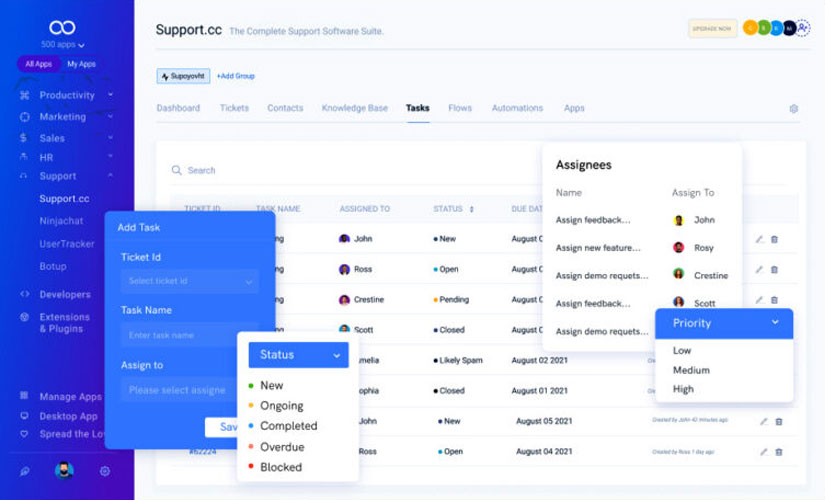
If your business still runs daily work through WhatsApp messages, phone calls, sticky notes, and scattered Excel sheets, you’re not alone. In many Bangladeshi companies HR follows up hiring tasks through messages, sales teams track leads in notebooks and operations teams manage delivery and procurement with whoever remembers first. It works until the team grows. Then tasks get missed deadlines slip and everyone feels busy but results don’t improve.That’s why more companies are adopting task software to build a simple, consistent workflow. When done right, task management software creates clarity: who is responsible, what’s due, what’s blocked and what’s completed across HR sales and operations.
In this people first in depth guide you’ll learn how to build a simple workflow that teams actually use without turning your company into a bureaucracy.
Why HR Sales and Operations Need a Shared Workflow
These three departments are tightly connected:
- HR hires and supports people who do the work
- Sales brings in customer demand and commitments
- Operations delivers the promises and handles procurement/logistics
When each department works in isolation, common problems appear:
- HR doesn’t know urgent hiring needs until it’s too late
- Sales promises delivery dates without checking operations capacity
- Operations delays are not communicated early, creating customer issues
- Managers spend time chasing updates instead of improving processes
A task workflow solves this by making work visible and predictable.
What Task Software Workflow Means (In Plain English)
A workflow in task software is:
- a repeatable set of steps for common work
- clear ownership for each step
- deadlines and reminders
- approvals where needed
- a dashboard to track progress
It’s not complicated automation. It’s simply your daily process written down in a tool—so it runs the same way every time.
1. Start With the Right Mindset Simple Wins Then Expand
Many teams fail because they try to digitize everything at once.
A better approach:
- Start with the 3 most common processes in each department
- Build simple boards/lists and templates
- Train teams with real examples
- Improve based on usage
Your first goal is adoption, not perfection.
2. Choose a Simple Structure That Works for All Teams
Most task tools offer multiple views:
- Kanban board (To Do Doing Done)
- List view (task list due dates)
- Calendar view (deadlines events)
- Timeline/Gantt (projects)
For HR, sales, and ops, the simplest starting structure is:
A) Department Boards (3 boards)
- HR Board
- Sales Board
- Operations Board
B) A Shared Cross-Team Requests Board
This is where departments assign tasks to each other:
- Sales requests urgent delivery check
- Operations requests manpower approval
- HR requests department head interview schedule
This one board reduces the “WhatsApp follow-up culture.”
3. Define Your Workflow Stages Keep It Universal
Use simple stages that every department understands:
Inbox / New In Progress Waiting / Blocked Review / Approval Done
Why this works:
- Inbox captures all requests
- Waiting shows blockers (approval, vendor, customer)
- Review/Approval prevents tasks being marked done too early
4. Build HR Workflow (Simple Practical Templates)
HR work is full of repeatable processes. Create templates so HR doesn’t start from zero every time.
HR Workflow Template 1: Hiring (Recruitment Pipeline Tasks)
Trigger: A department requests a new hire
Checklist example:
- Confirm job role and budget approval
- Create job description (JD)
- Post job on portals / social
- Shortlist candidates
- Schedule interviews (round 1/round 2)
- Final selection approval
- Offer letter preparation
- Joining documents collection
- Onboarding schedule
- Probation follow up task
HR Workflow Template 2: Employee Onboarding
Trigger: New employee joins
Checklist:
- employee profile entry
- ID card request
- email/account creation request (IT)
- attendance setup
- policy briefing and document signing
- department introduction
- training schedule
- first week feedback task
HR Workflow Template 3: Payroll and Attendance Monthly Checklist
Checklist:
- collect attendance summary
- verify overtime approvals
- verify leave adjustments
- prepare payroll sheet
- manager review
- salary disbursement
- payslip distribution
- payroll report archive
This helps HR stay consistent each month.
5. Build Sales Workflow (Lead-to-Deal Task System)
Sales often struggles not because leads are missing but because follow ups are inconsistent.
Sales Workflow Template 1: Lead Qualification
Stages:
- New Lead
- Contacted
- Qualified
- Proposal Sent
- Negotiation
- Won / Lost
Tasks for each lead:
- call within 24 hours
- record requirements
- schedule demo/meeting
- prepare proposal
- follow-up reminders (2 days / 5 days / 7 days)
Sales Workflow Template 2: Proposal to Delivery Handover (Critical)
This is where many businesses break: sales closes the deal, operations gets unclear info.
Create a mandatory handover task with:
- customer details
- delivery date commitment
- product/service scope
- payment terms
- special requirements
- delivery location and logistics notes
- required documents
This single template reduces future disputes.
Sales Workflow Template 3: Post Sale Follow up
After delivery:
- customer satisfaction call
- collect feedback
- request testimonial/review
- upsell/cross-sell planning
- renewal reminder (if applicable)
This improves retention and referrals.
6. Build Operations Workflow (Delivery Procurement Service)
Operations is where tasks become urgent quickly so visibility matters.
Operations Workflow Template 1: Procurement Request
Trigger: stock low or project requires purchase
Checklist:
- requirement confirmation
- supplier quotation collection (min 2/3)
- comparison and approval
- purchase order creation
- delivery tracking
- receiving and quality check
- stock entry/update
- vendor payment follow-up
This reduces emergency buying and improves cost control.
Operations Workflow Template 2: Project Delivery Installation
Checklist:
- site survey schedule
- material readiness check
- team assignment
- delivery plan
- installation checklist
- testing and handover
- customer sign-off
- support and warranty record
This is essential for service-oriented companies.
Operations Workflow Template 3: Daily Ops Checklist (Simple)
For factories warehouses or service teams:
- daily dispatch plan
- pending deliveries list
- urgent customer issues list
- blocked items and reasons
Even a basic list improves accountability.
7. Connect HR Sales Ops With a Shared Request System
Here’s the easiest cross-team method:
Use one shared board called: Internal Requests
Create request categories:
- HR Requests (e.g Need interviewer time,Need approval)
- Sales Requests (e.g Need delivery estimate, Need technical input)
- Ops Requests (e.g Need manpower, Need payment confirmation)
Rules:
- Every request must have owner due date
- Comments replace WhatsApp follow-ups
- Waiting/Blocked must state the reason
This is where workflow actually becomes company-wide.
8. Add SLAs Priorities and Approvals (Without Making It Heavy)
To keep it simple:
- Priority: Low / Medium / High / Urgent
- SLA: expected completion time (e.g Sales lead contact within 24h)
- Approval: only for sensitive tasks (discounts hiring budget purchases)
You don’t need approvals everywhere only where risk is high.
9. Dashboards That Managers Actually Need
If managers can’t see progress quickly they’ll go back to chasing updates.
Create dashboards like:
- Overdue tasks by department
- Tasks waiting for approval
- Workload by team member
- Sales pipeline tasks due this week
- Operations delivery tasks at risk
- HR hiring tasks by stage
A simple dashboard saves hours of daily follow up.
10. Rollout Plan (So Employees Actually Use It)
A practical rollout plan:
Week 1: Pilot
- 1 HR process 1 sales process 1 ops process
- 10-minute training
- keep WhatsApp as backup but reduce gradually
Week 2–3: Expand templates
- add more checklists
- refine stages and naming
- create shared “Internal Requests” board
Week 4: Policy
- If it’s not in the task system, it’s not assigned.
- weekly review meeting using the dashboard
This makes adoption real.
How GCTL Infosys Can Help
GCTL Infosys helps organizations build task-based workflow systems that match real business operations. We can provide:
- custom task management software (web mobile ready)
- workflows for HR, sales, and operations
- approvals, role-based access, and audit logs
- dashboards and KPI reporting
- integrations (email, SMS, calendar, ERP/CRM)
- onboarding and training
We focus on usability so your team adopts it quickly.
FAQs
1) What is the best workflow structure for task management software?
A simple stage-based workflow works best: Inbox In Progress Waiting/Blocked Review/Approval Done.
2) How can task software improve HR processes?
It standardizes hiring onboarding payroll checklists and follow ups reducing missed tasks and improving consistency.
3) Can task software help sales teams close more deals?
Yes. Follow-up reminders lead stages proposal tasks and handover checklists improve conversion and reduce drop-offs.
4) How does operations benefit from task workflows?
Operations gets clear delivery/procurement checklists fewer missed steps and better visibility into delays and blockers.
5) How do we ensure employees actually use the task system?
Start with a pilot use templates keep workflows simple and apply a rule: tasks must be assigned and tracked in the system.