In today’s competitive business environment, task management software has become a must-have solution for organizations that want to improve efficiency, increase accountability, and boost overall team performance. Whether you run a startup, a growing company, or a large enterprise, the right task management software can transform the way your team plans, tracks, and completes work. Instead of relying on scattered emails, spreadsheets, verbal instructions, or disconnected tools, businesses can use a centralized platform to organize tasks, set priorities, track deadlines, and improve team collaboration.
For many companies, productivity problems do not happen because employees lack talent or motivation. They happen because teams often struggle with poor communication, unclear responsibilities, missed deadlines, duplicated efforts, and inefficient workflows. This is exactly where task management software for business delivers real value. It helps teams stay aligned, reduces confusion, improves visibility, and creates a smoother work process from start to finish.
As businesses continue to embrace digital transformation, hybrid work, and faster decision-making, using the right workflow management software is no longer optional. It is now a practical step toward building a more productive and organized workplace. In this guide, we will explore how task management software improves team productivity, what features matter most, and why it is becoming a core tool for modern businesses.
What Is Task Management Software?
Task management software is a digital tool that helps businesses and teams create, assign, prioritize, track, and complete tasks more efficiently. It gives managers and employees a structured way to organize daily work, monitor project progress, and ensure that responsibilities are clearly assigned.
A modern task tracking system often includes features such as:
- Task creation and assignment
- Due dates and reminders
- Priority labels
- Progress tracking
- Team collaboration tools
- File sharing
- Dashboard reporting
- Project timelines
- Workflow automation
- Mobile accessibility
Instead of managing tasks through multiple disconnected channels, employees can work from one unified platform. This creates clarity, improves coordination, and reduces the chances of important tasks being forgotten or delayed.
Why Team Productivity Matters More Than Ever
Productivity is one of the most important factors in business success. A productive team completes work on time, communicates effectively, and uses resources efficiently. Higher productivity often leads to better customer service, stronger project outcomes, improved profitability, and a healthier work environment.
However, many businesses face common productivity barriers such as:
- Unclear task ownership
- Poor communication between departments
- Last-minute deadline pressure
- Lack of progress visibility
- Too many manual follow-ups
- Difficulty managing remote or hybrid teams
- Confusion over priorities
These problems slow teams down and create unnecessary stress. Task management software solves these challenges by providing a clear system for organizing and monitoring work. It gives every team member visibility into what needs to be done, who is responsible, and when it must be completed.
How Task Management Software Improves Team Productivity
1. Creates Clear Task Ownership
One of the biggest causes of inefficiency in any workplace is unclear responsibility. When no one knows exactly who owns a task, work gets delayed, duplicated, or ignored.
A strong task management software solution solves this by assigning each task to a specific person or team. Employees can clearly see:
- What they need to do
- When it is due
- What priority it has
- What supporting files or notes are attached
This clear ownership improves accountability and reduces the chances of tasks falling through the cracks. When responsibilities are visible, teams work with more confidence and less confusion.
2. Improves Team Collaboration
Modern work depends heavily on collaboration. Teams need to share updates, exchange ideas, review files, and coordinate tasks across departments. Without the right system, collaboration often becomes messy and time-consuming.
Task management software improves collaboration by bringing communication and task tracking into one place. Instead of searching through long email chains or chat messages, team members can:
- Comment directly on tasks
- Share files in context
- Tag relevant colleagues
- Provide status updates
- Ask questions where the work is happening
This creates a more organized and transparent workflow. Everyone involved can see the latest updates, which reduces misunderstandings and keeps projects moving forward.
3. Helps Teams Prioritize Work Better
Not all tasks have the same level of urgency or importance. Without a proper system, employees may spend too much time on low-impact work while critical tasks are delayed.
A good team task management software platform allows managers and employees to set priorities using labels, deadlines, categories, and project stages. This helps teams focus on the most important work first.
With better prioritization, businesses can:
- Reduce deadline pressure
- Improve time management
- Focus on high-value tasks
- Avoid unnecessary distractions
- Deliver work faster and more consistently
Prioritization is one of the simplest but most powerful ways task management tools improve daily productivity.
4. Reduces Missed Deadlines
Missed deadlines affect business performance, customer trust, and internal morale. In many cases, deadlines are missed not because employees are careless, but because task tracking is weak.
Task management software for teams helps prevent missed deadlines through:
- Due date settings
- Automated reminders
- Progress indicators
- Task dependencies
- Shared calendars
- Notifications for overdue work
These features ensure that deadlines stay visible and actionable. Employees are less likely to forget key tasks, and managers can identify delays before they become bigger problems.
5. Increases Visibility Across Projects
Managers often struggle when they cannot see what teams are working on in real time. Without visibility, it becomes difficult to balance workloads, track progress, or solve bottlenecks quickly.
A centralized project and task management software system gives leaders a clear overview of:
- Completed tasks
- Pending tasks
- Delayed activities
- Employee workloads
- Project status
- Department performance
This visibility allows managers to make faster and better decisions. They can spot resource gaps, support struggling team members, and improve project execution without waiting for manual updates.
For employees, visibility also creates alignment. Everyone understands how their individual work contributes to team goals.
6. Supports Remote and Hybrid Teams
The way businesses work has changed significantly. Many companies now manage remote employees, hybrid teams, and distributed operations. In these environments, productivity can suffer if task tracking is weak or communication is unclear.
Task management software supports remote work by providing one shared digital workspace where employees can access tasks, updates, files, and deadlines from anywhere.
This is especially helpful for:
- Remote teams
- Hybrid workplaces
- Multi-branch organizations
- Field teams
- Agencies with flexible schedules
With cloud-based access and mobile-friendly interfaces, employees remain connected and productive even when they are not in the same office.
7. Minimizes Manual Follow-Ups
Many managers spend too much time chasing updates, reminding employees, and checking task progress manually. This wastes time and creates frustration for both managers and team members.
A smart workflow management software platform reduces this burden with automation features such as:
- Automatic status changes
- Reminder notifications
- Recurring task setup
- Approval workflows
- Progress tracking dashboards
This means less time spent on administrative follow-up and more time focused on meaningful work. Automation also makes workflows more consistent and reliable.
8. Improves Time Management
Good time management is essential for productivity. When employees know exactly what to do and when to do it, they can plan their day more effectively.
Task management tools help teams manage time by providing:
- Structured task lists
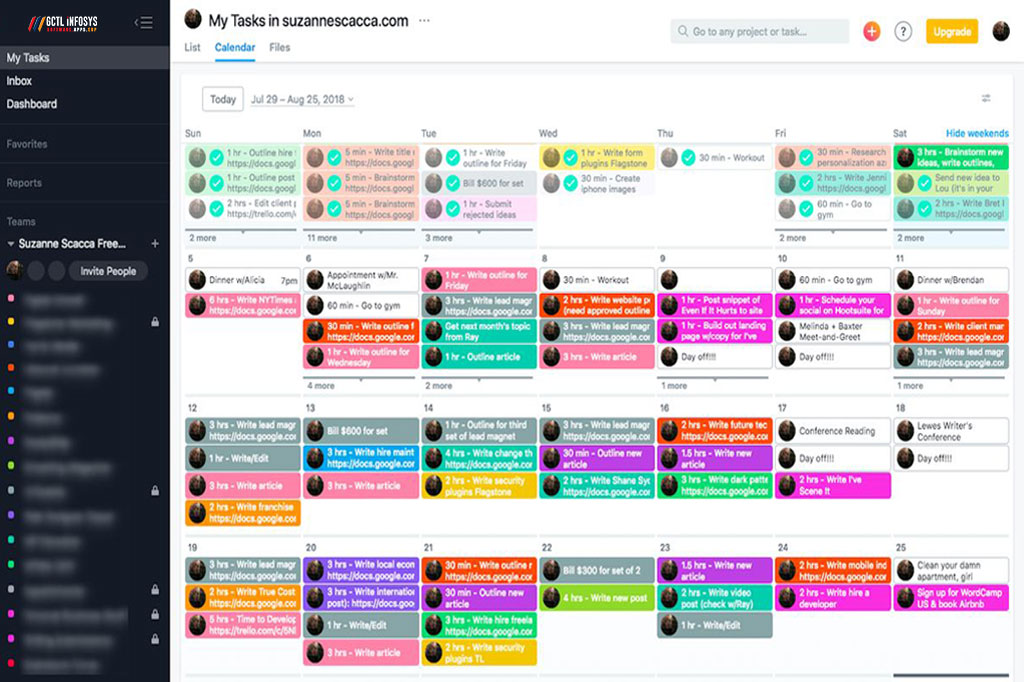
- Calendar views
- Timelines
- Estimated completion times
- Deadline alerts
- Priority filters
These features help employees break work into manageable steps, reduce last-minute rush, and stay focused throughout the day.
Over time, this leads to more disciplined work habits and better team performance.
9. Reduces Work Duplication and Confusion
In businesses without a proper task system, different employees may unknowingly work on the same thing, or assume someone else is handling it. This leads to duplicated effort, wasted time, and avoidable mistakes.
A centralized task management system reduces this risk by making tasks visible, assigned, and trackable. Everyone can see:
- Who is working on what
- What stage a task is in
- What has already been completed
- What still needs attention
This clarity improves coordination and helps teams work more efficiently.
10. Encourages Accountability and Performance
When tasks are clearly assigned and progress is visible, accountability improves naturally. Team members know what is expected, and managers can track whether deadlines and responsibilities are being met.
This does not mean creating pressure for the sake of control. Instead, it creates a culture of responsibility, transparency, and ownership.
With task management software, accountability improves because:
- Tasks are assigned to individuals
- Due dates are documented
- Progress is visible to relevant stakeholders
- Delays and blockers are easier to identify
This often leads to stronger individual performance and better team output over time.
Key Features That Make Task Management Software Effective
Not all task management tools offer the same value. To truly improve team productivity, businesses should look for features that support real work needs.
User-Friendly Dashboard
A clean and simple dashboard helps teams adopt the system quickly and use it daily without friction.
Task Assignment and Ownership
Every task should be clearly assigned with deadlines and status tracking.
Priority and Deadline Management
This helps teams focus on urgent and important work first.
Collaboration Tools
Comments, file sharing, mentions, and discussion features improve team coordination.
Project Views
Kanban boards, list views, calendar views, and timeline views help teams work in their preferred style.
Reporting and Analytics
Managers need insights into progress, workload, delays, and performance.
Mobile Access
Teams should be able to manage work from smartphones and tablets.
Integration Capabilities
The software should connect with email, calendars, CRM systems, communication tools, and business applications.
Automation Features
Automation saves time and reduces repetitive manual work.
Scalability
The platform should grow with your business as your teams and projects expand.
Which Businesses Benefit Most from Task Management Software?
Almost every industry can benefit from using task management software, but it is especially valuable for businesses that handle multiple tasks, teams, or ongoing projects.
Examples include:
- Software and IT companies
- Marketing agencies
- Construction firms
- Healthcare organizations
- Educational institutions
- Corporate offices
- E-commerce businesses
- Logistics companies
- Consulting firms
- Creative agencies
Whether your team is small or large, a good task management system helps create structure and improve execution.
Common Signs Your Business Needs Task Management Software
Your organization may need task management software for productivity if you often experience:
- Missed deadlines
- Disorganized workflows
- Poor team communication
- Confusion about responsibilities
- Difficulty tracking progress
- Too many manual reminders
- Scattered work across emails and chats
- Lack of visibility for managers
If any of these issues sound familiar, implementing the right tool can significantly improve your operations.
Common Mistakes to Avoid When Choosing a Task Management Tool
Choosing a Tool That Is Too Complex
If the platform is difficult to use, team adoption will be low.
Ignoring Integration Needs
The software should fit into your existing business workflow.
Focusing Only on Price
The cheapest tool may cost more in lost productivity if it lacks essential features.
Not Considering Future Growth
Choose a scalable solution that can support more users and projects over time.
Failing to Train Employees
Even the best software needs proper onboarding for strong adoption.
How GCTL Infosys Can Help Your Business
At GCTL Infosys, we understand that productivity is at the heart of business growth. As a leading software and web development company based in Dhaka, Bangladesh, we build digital solutions that help organizations work smarter, communicate better, and achieve more.
If your business is looking for a reliable task management software solution, GCTL Infosys can help with:
- Custom software development
- Business workflow automation
- Team collaboration tools
- User-friendly dashboard design
- Integration with existing business systems
- Ongoing technical support and consultancy
Our experienced developers, designers, and IT professionals work closely with each client to create tailored solutions that match real business needs. Whether you need a simple internal task tracker or a fully customized productivity platform, GCTL Infosys can deliver a solution that supports your team and drives long-term efficiency.
Final Thoughts
Task management software is much more than a digital checklist. It is a practical business tool that helps teams stay organized, collaborate smoothly, meet deadlines, and perform at a higher level. By improving visibility, reducing confusion, increasing accountability, and supporting better planning, it plays a direct role in boosting team productivity.
As businesses continue to grow and adapt to new ways of working, having the right task management system becomes a major competitive advantage. It helps employees stay focused, managers stay informed, and projects stay on track.
If your organization wants to improve workflow efficiency, team coordination, and daily productivity, investing in the right task management software is a smart move. And if you need a trusted technology partner to build or customize the right solution, GCTL Infosys is ready to help.
FAQs
1. What is task management software?
Task management software is a digital tool that helps businesses create, assign, organize, and track tasks to improve workflow and team productivity.
2. How does task management software improve team productivity?
It improves productivity by clarifying responsibilities, tracking deadlines, reducing confusion, improving collaboration, and increasing visibility across projects.
3. Is task management software useful for small businesses?
Yes, small businesses can benefit greatly because it helps organize work, manage limited resources, and keep teams aligned without complexity.
4. Can task management software support remote teams?
Yes, most modern task management platforms are cloud-based and allow remote or hybrid teams to manage tasks, share updates, and collaborate from anywhere.
5. What features should I look for in task management software?
Look for task assignment, deadline tracking, collaboration tools, reporting, mobile access, automation, integrations, and scalability.