
When Your Business Needs a Custom Web Application
Many businesses start with spreadsheets, email, messaging apps and a few disconnected software tools. In the early stages, that can be enough. Employees know where the files are, approvals happen informally, and management can still follow most activities without a centralized system.
The problem usually appears as the business grows.
More customers create more records. More employees create more approvals. Different departments begin maintaining separate spreadsheets. Management has to ask several people for the same report. Customers call because they cannot check the status of a request themselves.
At this stage, the issue is not simply that the company needs “more software.” The real question is whether a custom web application could organize the workflow more effectively.
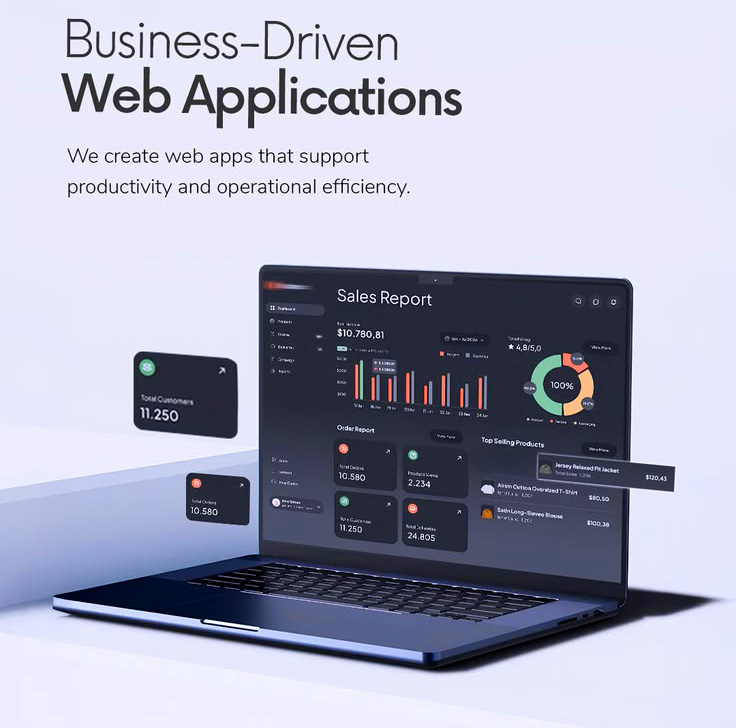
A business web application can provide secure user access, dashboards, structured records, approval processes, reporting, portals and integrations through a browser. Unlike a standard company website, users do not simply read information—they interact with the system and complete business tasks.
For organizations considering this type of solution, GCTL Infosys provides dedicated Application Development services for custom browser-based business systems, portals, dashboards and workflow applications.
A Website and a Web Application Serve Different Purposes
The difference between a website and a web application is important because businesses often use the terms interchangeably.
A website primarily helps visitors consume information.
For example, a company website may allow someone to:
- Learn about the organization
- Explore services
- View products
- Read case studies
- Submit an inquiry
- Find contact information
A web application is more interactive.
A user may:
- Sign in to an account
- Add or edit records
- Submit requests
- Track progress
- Approve documents
- Upload files
- Generate reports
- Manage customers
- Use a dashboard
- Complete a business workflow
If your main requirement is a public-facing corporate or service website, GCTL’s Website Development Company in Bangladesh service is the more relevant option.
If users need to log in and actively work with data or processes, a custom web application may be the better direction.
Signs Your Business May Need a Custom Web Application
Not every business needs custom application development.
In many cases, an existing commercial platform can solve the problem perfectly well. Developing a custom system only makes sense when there is a clear operational requirement.
Several situations can indicate that a custom application is worth considering.
Your Team Relies Heavily on Spreadsheets
Spreadsheets are flexible and useful, but they become difficult to manage when many people depend on them for daily operations.
Typical problems include:
- Duplicate files
- Different versions of the same information
- Accidental edits
- Complex formulas
- Limited permission control
- Manual reporting
- Difficult collaboration
A database-driven application can centralize the information and control how different users create, edit and view records.
The objective is not necessarily to eliminate spreadsheets completely. It is to move business-critical processes into a more structured environment where necessary.
Employees Enter the Same Data Multiple Times
Repeated data entry is a common sign of disconnected business processes.
For example, a customer request may first be recorded in a spreadsheet, copied into another department’s system and later entered again for reporting.
Every manual transfer creates additional work and another opportunity for error.
A custom application can sometimes connect these stages so the original information moves through the workflow without being entered repeatedly.
Approvals Are Managed Through Email or Messaging Apps
Email and messaging platforms are useful for communication, but they are often difficult to use as formal approval systems.
Imagine a purchase request that passes through:
Employee → Department Manager → Finance → Management → Procurement
When every approval happens through separate messages, it becomes difficult to see the current status or determine who approved what.
A workflow application can create a structured process where each request has:
- A current status
- Assigned users
- Approval history
- Comments
- Documents
- Timestamps
Management can then follow the process without searching through long message threads.
Your Business Needs a Customer Portal
A customer portal can give clients controlled access to information related to their account or service.
Depending on the business model, customers may be able to:
- Submit requests
- Upload documents
- Track service status
- View account information
- Download files
- Review previous requests
- Update selected information
This can reduce routine communication while giving customers better visibility.
A portal should not expose every internal business process. It should provide only the information and functions relevant to the customer.
Your Employees Need a Centralized Portal
Internal portals can also solve operational problems.
Employees may currently depend on multiple links, spreadsheets, emails and shared folders to complete basic tasks.
An employee portal can bring relevant functions into one controlled environment.
Depending on requirements, that could include:
- Internal requests
- Documents
- Tasks
- Notices
- Approval workflows
- Department information
- Reports
- Role-specific tools
Permissions can be used so users see only the information relevant to their role.
Management Needs Better Dashboards and Reports
Many companies have plenty of data but still struggle to answer simple management questions.
The issue is often not the absence of information. It is that the information is scattered across several locations.
A management dashboard can bring selected information together and present it in a usable format.
Examples may include:
- Open requests
- Completed tasks
- Service status
- Customer activity
- Department performance
- Operational trends
- Pending approvals
The dashboard should not contain every number available in the database.
Useful dashboard design begins by asking:
What decisions does this user need to make?
The answer determines which information deserves priority.
Your Workflow Is Too Specific for Standard Software
Ready-made platforms can be excellent when a business follows a common process.
But some organizations work differently.
Perhaps requests require several unusual approval stages. Maybe customer records must be connected with unique documents. Perhaps several departments use the same case but perform completely different actions.
Trying to force a highly specialized process into generic software can create additional manual work.
This is where custom business application development can be useful.
The application can be designed around the actual workflow rather than requiring the organization to redesign its operations around the limitations of a template.
Your Existing Systems Need to Communicate
A business does not always need to replace its existing systems.
Sometimes the real problem is that they do not communicate.
For example, an application might need to connect with:
- Existing business software
- Payment services
- Email services
- SMS platforms
- Authentication providers
- External databases
- Third-party APIs
An application can sometimes act as a layer between existing systems, helping users work with information through a more unified process.
Integration feasibility depends on the technical capabilities of the systems involved, particularly whether suitable APIs or other supported connection methods are available.
When a Custom Application Is Not the Right Choice
Custom development should not automatically be the first recommendation.
If a reliable existing product already solves the problem at a reasonable cost, using that product may be more practical.
A custom application may not be necessary when:
- Requirements are very standard
- A proven commercial platform already fits the workflow
- The business has not clearly defined its process
- The required functionality is extremely limited
- There is no plan for maintaining the system
- The project exists only because a competitor has an application
Technology should solve a real problem.
Before developing anything, identify what would become faster, clearer or easier after the application is introduced.
Custom Web Application vs Business Software
These categories can overlap, but they often represent different types of projects.
At GCTL Infosys, it is useful to separate them by the business requirement.
| Requirement | More Suitable Direction |
| Browser-based customer or employee portal | Application Development |
| Management dashboard | Application Development |
| Approval/workflow platform | Application Development |
| SaaS platform | Application Development |
| ERP | Software Development |
| HR and payroll system | Software Development |
| POS system | Software Development |
| Inventory management system | Software Development |
Organizations looking for ERP, HR, POS, inventory and other operational software can explore GCTL’s Software Development services.
The distinction prevents businesses from choosing a solution simply because two services sound similar.
Custom Web Application vs Mobile App
Another common source of confusion is the difference between a web application and a mobile application.
A web application normally runs through a browser.
A mobile application is installed or delivered specifically for mobile operating environments.
Both can sometimes solve similar problems, but the user experience and technical approach differ.
A company may prefer a browser-based application when employees need access from desktops and laptops, while a customer-facing service may benefit from a dedicated mobile experience.
For Android, iOS or hybrid mobile projects, GCTL provides a separate Mobile App Development service.
Keeping the project requirement clear from the beginning makes technology selection easier.
Important Features of a Business Web Application
The exact features depend on the application, but several capabilities are common across business systems.
Secure User Authentication
Users should have an appropriate way to identify themselves before accessing restricted functionality.
Authentication requirements may vary according to the sensitivity of the system.
Role-Based Permissions
Not every user should receive the same access.
For example:
- Employees may create records
- Managers may approve them
- Administrators may configure settings
- Customers may view only their own information
Permissions should be planned from the beginning.
Structured Forms and Validation
Business applications often depend heavily on forms.
Good forms should:
- Request only necessary information
- Use clear labels
- Validate important fields
- Explain errors
- Reduce unnecessary manual work
Forms are a major part of the user experience.
Search and Filtering
As records increase, users need practical ways to find information.
Search, filters, sorting and status views can be more valuable than visually impressive dashboards if employees use them throughout the day.
Reporting
Reporting requirements should be discussed before the application is built.
Ask:
- Who needs the report
- Which fields matter
- How frequently it is used
- Whether exporting is required
- Whether the information needs to be real-time
Audit History
Some applications need to record important actions.
For example:
- Who created a record
- Who changed it
- Who approved it
- When the action occurred
This may be particularly useful for structured approval processes.
Planning a Custom Application Before Development
Good application projects begin with questions, not code.
Before development starts, the organization should document how the process currently works.
Define the Business Problem
Avoid starting with a statement such as:
“We need an application.”
Instead, define the problem:
“Our service team cannot easily track requests across three departments.”
That gives the project a measurable purpose.
Identify the Users
List the types of people who will use the application.
For example:
- Customers
- Employees
- Managers
- Administrators
- Vendors
- Partners
Each group may require different functions.
Map the Workflow
Write the process in simple stages.
For example:
Customer Request → Review → Assignment → Work → Approval → Completion
This immediately reveals which screens, permissions and statuses may be required.
Define Essential Features First
Separate features into categories such as:
Required for launch
Useful later
This prevents the initial scope from becoming unnecessarily large.
Identify Existing Data
If information already exists in spreadsheets, databases or another system, determine whether it needs to be migrated.
Data migration can be a significant part of a project and should not be treated as a last-minute task.
Choosing the Right Technology
Businesses often begin application discussions by asking:
“Should we use PHP, Laravel, .NET or Python?”
That is usually too early.
Technology should follow requirements.
The development team should first understand:
- Application type
- Users
- Data
- Workflows
- Integrations
- Security
- Expected growth
- Existing technical environment
GCTL’s Application Development category includes dedicated services for technologies such as .NET, PHP, Laravel, Java, Python and CodeIgniter.
For example, businesses with suitable PHP framework requirements can review the dedicated Laravel Application Development service.
The important point is to choose technology because it fits the application—not because a framework happens to be popular.
Security Should Be Planned Early
Business applications may contain customer, employee or operational data.
Security should therefore influence architecture, permissions and development practices from the beginning.
Important considerations include:
- Authentication
- User permissions
- Input validation
- Session management
- Secure API handling
- Backup planning
- Logging
- Error handling
- Data access
Security requirements vary considerably between projects.
The correct approach depends on what the application does and the sensitivity of the information involved.
Testing Real Business Workflows
Technical testing is important, but business applications also need workflow testing.
A feature can work technically while still creating problems for real users.
Testing should include scenarios such as:
- A normal user creates a request.
- A manager reviews it.
- The request is returned for correction.
- The user updates it.
- The manager approves it.
- The final status appears in the report.
This type of testing helps identify workflow problems that individual feature tests may miss.
Planning for Maintenance After Launch
Applications change because businesses change.
Employees may request a new report. A department may introduce a different approval process. An external API may change. Management may want a new dashboard.
Before launch, businesses should understand:
- Who handles bugs
- How updates are requested
- Who maintains infrastructure
- How backups are managed
- How new features are scoped
- What access the organization receives
Treating application development as a long-term operational asset often leads to better decisions than viewing it as a one-time project.
How Application Development Can Support Business Growth
A custom application does not automatically make a business more productive.
The benefit comes from improving the underlying process.
A well-planned application may help a business:
- Reduce duplicate data entry
- Standardize workflows
- Improve visibility
- Shorten approval processes
- Centralize information
- Improve customer access
- Produce reports more efficiently
- Connect disconnected systems
- Support additional users or branches
But these benefits depend on good planning and actual user adoption.
The application should make work easier—not introduce another system employees have to work around.
Final Thoughts
Businesses usually do not need a custom web application simply because they are becoming more digital.
They need one when an important process can no longer be managed efficiently through spreadsheets, email, messaging apps or disconnected systems.
The best starting point is therefore not:
“Which framework should we use?”
It is:
“Which business process are we trying to improve?”
Once the workflow, users, data and goals are understood, it becomes much easier to determine whether a portal, dashboard, SaaS platform, workflow application or another custom solution is appropriate.
If your organization needs a browser-based business application with user roles, workflows, dashboards, database functionality or system integrations, explore GCTL Infosys’ Application Development services in Bangladesh or contact GCTL Infosys to discuss your project requirements.